Accessible Collections
Large Print Books
Available to all library customers, large print books are complete, unabridged texts with clear type in at least 13-point font. Large print books can be found at both library branches. Our collections include a choice of titles including bestsellers, mysteries and non-fiction.
Audiobooks on CD
NTPL has a large collection of abridged and unabridged books on CD that are available to borrow from all three branches of the library. These books are recordings of text being read, often by actors or other talented narrators. They can be played over your computer or your CD player.
Downloadable Audiobooks
These books are recordings of text being read, often by actors or other talented narrators. They are sound files, in various formats, and can be played over your computer, MP3 player, or on other listening devices depending on the file format. All you need to download audio books from the library is your library card (with PIN), Internet access, and listening/transferring software as explained below.
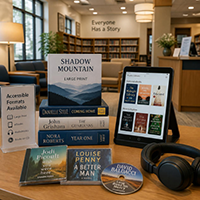
Browse, Checkout, Download – Easy as 1-2-3: Use your New Tecumseth Public Library card to download audio books and listen to them on the go! Our catalogue has over 2500 audio books available in MP3 format. MP3 books can be enjoyed on a computer, or downloaded directly to mobile devices (iPhone/Pad, Android, Blackberry, and Windows Phone) that have the Libby app and/or cloudLibrary app installed.
Playaway Recorded Audiobooks
A solid-state pre-recorded audio player that is about the size of a deck of playing cards and weighs 2 ounces (57 grams). It can store up to 80 hours of high definition audio. The digital content is preloaded at the factory and cannot be changed or copied by the end user. A 3.5 mm stereo jack provides output to earphones or an external amplifier.
Daisy Audiobooks
DAISY (Digital Accessible Information System) is an international format standard developed by libraries for the blind. DAISY audio books have superior sound quality and functionality compared to other audio formats. Special features include chapter, paragraph, phrase and word navigation, bookmarking, skimming, sleep modes and reading speed control.
DAISY titles fit on a single compact disc. These discs are meant to be played in special DAISY-compatible machines such as Victor Readers. For a list of player vendors, visit the DAISY marketplace. Because of their special formatting, DAISY discs cannot be played on standard CD players unless those players are MP3-compatible. If your CD player was manufactured in the last five years, there’s a good chance it is MP3-compatible and will also play DAISY audio books, although many of the special navigation features will not be available. At present, the New Tecumseth Public Library owns two Victor Reader DAISY playback devices. Upon request, these units can be borrowed at any of our branches.
DAISY titles can also be listened to on your computer, using DAISY playback software.
Digital Readers
Digital Readers allow for simple, easy navigation such as browsing the table of contents, skipping from section to section or from page to page. Victor Reader players are ideal for your favorite leisure reading, bestsellers, novels, magazines, etc. All of the VICTOR players can play audio CDs as well as MP3 formats and DAISY standard digital books.
Special Services
OneTap

What is OneTap?
This accessibility tool allows you to adjust text size, contrast, and navigation settings.
Using OneTap
Click on the OneTap Icon that appears on the top right corner of each page of this website to launch the OneTap toolbar.
The toolbar will allow you to set your preferences for Content Modules; Color Modules; and Orientation Modules; and Skip to Content. Once you have set your preferences, simply close the tool. If you want to change your settings, click Reset Settings and start fresh.
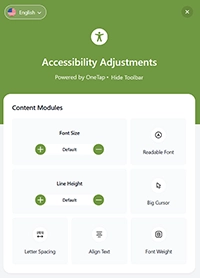
Content Modules: You can change your font size and line height by using the plus/minus buttons. You can turn on Readable Font, Big Cursor, Line Spacing, and Font Weight just by clicking them. You can select Align Text – click to adjust from the default (centered) to Left, Centered or Right aligned.
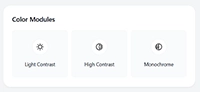
Color Modules: Choose from Light Contrast, High Contrast and Monochrome settings – click once to turn on and a second time to turn off each option.
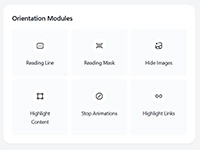
Orientation Modules: This section allows you to make adjustments to how you view the page. You can turn on any of the following features by clicking on it. Clicking a second time will turn it off.
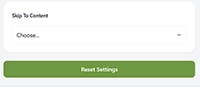
Skip to Content: When you click on the drop-down menu, you can choose to skip to Main Content, Navigation or Footer.
Reset Settings: If you click this button, it returns all settings to their defaults.
AODA Information and Communication Standard
Disabilities affect people of all backgrounds, and the number of Canadians living with disabilities continues to grow. From 2017 to 2022, the proportion of Canadians aged 15 and older with one or more disabilities increased from 22% (6.2 million) to 27% (8 million).
The Accessibility for Ontarians with Disabilities Act (AODA) mandates full province-wide accessibility through the Integrated Accessibility Standards Regulation (IASR). The IASR removes barriers across five core areas, including the Information and Communications Standards, which require organizations to make all information—including websites—fully accessible. Rather than enforcing prescriptive methods, these objective-based regulations grant organizations the flexibility to develop their own compliant policies, practices, and procedures.
NTPL’s commitment to accessibility began in 2014 through an Enabling Accessibility Fund grant that supported the redevelopment of websites and catalogues for 10 County of Simcoe Library Co-operative member libraries. Website redevelopment in 2020 and again in 2026 has continued to strengthen NTPL’s accessibility and support compliance with, and progress beyond, AODA standards.
Comments or information about our AODA commitment may be shared by emailing Jessica Mole at [email protected].